

My Big Beta Weekend
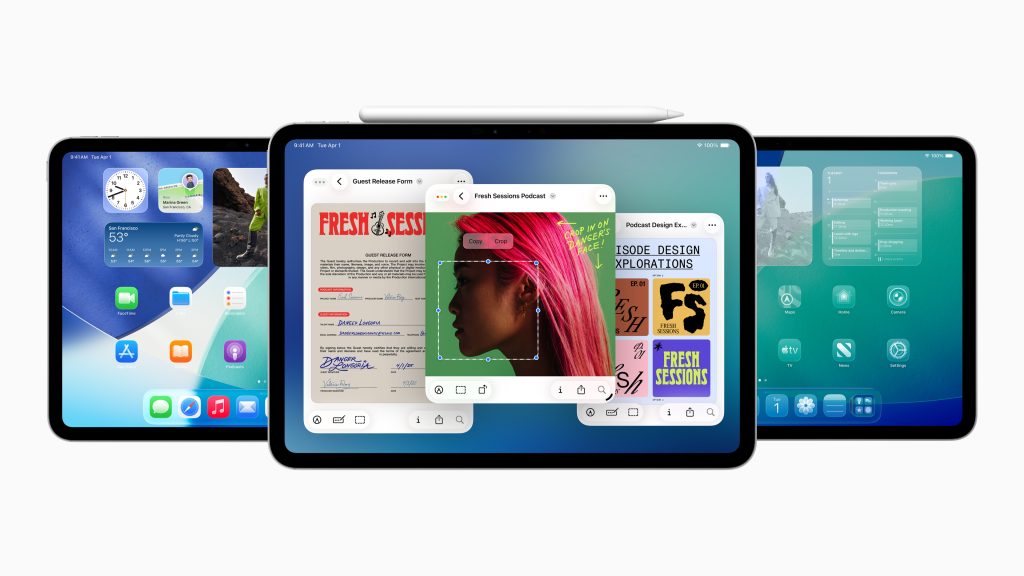
This weekend I decided to bite the bullet and embrace the “betas” released by Apple at the recent WWDC. I wanted to try out all the new features that Apple had announced and separate the wheat from the chaff.
No, I didn’t download the beta on my main machines. My every day iPhone, iPad, and Mac Studio have been untouched. The only everyday device that I upgraded to beta is the Vision Pro.
Instead, I installed the updates on two loaner devices — an iPad 11 and a MacBook Air — both M4 editions that had been sent for reviews. I don’t have an extra iPhone, so no update on that device just yet. It is too vital for my life to muck about.
It is too early to have any serious impressions about the new operating systems, but so far, I can see the biggest change is on the iPad, as iPadOS 26 feels like a whole new animal. There are just so many changes that I will be spending a lot of time on the “beta” device over next few days.
But already, you can tell that it is as if iPad and Mac finally kissed and made up. In fact, the new OS has me wondering why Apple doesn’t make a larger iPad — you know, like a 15-inch model. I like the ability to arrange multiple apps on the screen. The ability to arrange four apps on a single screen is really a visual delight, and also a sign of how things might work on the rumored foldable iPhone if it ever materializes.
The three key things that are amazing for me:
- Ability to resize windows, place them anywhere, and open more at once. This makes me want a bigger iPad.
- Super charged Files app. This just makes everything so much better on iPad. I mean seriously, just finding photos across drives is going to be so much better. I am just shocked that they don’t have “Apple Intelligence” here to help make sense of it all. I mean, everyone is launching this search-with-AI feature.
- Dedicated Preview app for PDFs and images with Apple Pencil support. Again, a little thing but very useful.
- I can use Journal app with Apple Pencil. I can scribble better than typing.
- Reed pen for calligraphy. Not giving up my fountain pens, but this is kind of pen-geek cool for me.
- Ability to record high-quality audio with voice Isolation and capture local recordings during video calls. I like this because I do a lot of my Zoom calls on my iPad.
Well, those are the things that caught my eye after using iPadOS 26 for a few hours.
Similar to iPadOS 26, VisionOS 26 has quite a few minor improvements. I can tell because I am a near-daily user of the device. There are some under-the-hood changes that point to a better experience in months to come. Games, in particular,could get big boosts, and so will the whole “VR” ecosystem. I have my fingers crossed for now, as I would certainly love to use the device for more things than just watching baseball, movies, and television series.
Here is a summary of some of the top additions and improvements in VisionOS 26 enhancements:
- Look to Scroll provides hands-free eye-controlled navigation. One can navigate apps and websites using just your eyes. This is seriously cool.
- Spatial Widgets is a way to customize your space’s colors and depth. Think of it as pimp-your-virtual-spaces.
- New generative AI transforms regular photos into immersive spatial scenes with multiple perspectives. I am not impressed.
- Enhanced Personas feature dramatic realism improvements with full profiles and over 1,000 glasses options. I am so glad I’m not scary even to myself now.
- Shared Room Experiences let multiple Vision Pro users collaborate locally. I am looking forward to nerding out on this one. Sadly, most of my friends have returned their VisionPros.
- New Content Formats include 180°/360° playback from GoPro and Insta360. Now I need to get a GoPro — finally.
I need time with MacOS 26, but on the surface, I love the updates they have done to the operating system and its user interface. There is a lot to dig into, but for now, I am loving the new “Spotlight” command center. It allows me essentially replicate the functionality of QuickSilver and Raycast in a simpler fashion. That alone is worth the “beta” risk.
Matt Mullenweg is a fan of the new “Spotlight” too. “My favorite thing to play with so far has been the new Spotlight (what pops up when you press Command + Space) and related shortcuts,” he writes in a useful blog post. “I loved Alfred,I tried Raycast, but a general life goal this year is to simplify wherever I can, so I’ve been exploring the enhancements in the new Spotlight.”
My initial impressions are favorable, but again, I am running these on clean, new machines and have not done upgrades on existing machines. My friends tell me they have had problems with the upgrades and have reverted back to the currentversions of the OS.
I will keep you updated on my beta OS journey as it unfolds.
Updated at 7.30 pm: Apple released the latest versions of their beta operating systems (beta #2) today. I updated the machines. The improvements are coming thick and fast.
June 23, 2025
7 thoughts on this post
Comments are closed.
I wonder how serious Apple is about buying Perplexity. Seems like a marginal overpay might not be a bad thing given where they are where they are with AI.
My best bet is that Perplexity backers are spreading that information because it is clear that they are going to be squeezed hard by the big three of AI.
Thanks for the update, I value your opinion more than most! The first thing I thought of when I saw iPad OS 26 was this a 15 inch iPad. Here’s hoping
I am pretty sure making a “spec” upgrade is par for course for Apple these days. Don’t be surprised 🙂
That should have read “when I saw iPad OS 26 was this needs a 15 inch iPad!” Sorry about that
Don’t run the beta on the watch….if you don’t like it, the only path to downgrade is to send the device back to Apple.
Thanks for the heads up. I don’t have a watch so nothing to worry about jt just yet 🙂